My First Conversation with Amazon Bedrock
As I prepare for the AWS Certified AI Developer certification, I decided to take a different approach. Instead of only reading docs and watching videos, I'm building real applications using Amazon Bedrock and documenting everything I learn along the way.
"The best way to learn AI on AWS isn't by reading about it—it's by building with it."
📘 Series: Building AI Applications on AWS
Our goal for this first milestone is intentionally simple. We want to send a prompt to Amazon Bedrock and receive an AI-generated response.
It might not sound like much, but this single interaction forms the foundation for every project that follows in this series.
By the end of this article I'll have a Python application that:
- Authenticates with AWS
- Connects to Amazon Bedrock
- Sends a prompt to a foundation model
- Displays the generated response
Everything covered in this article is available on GitHub and each article in this series is linked to a specific Git tag. This ensures that the code you see in the blog matches the code in the repository at that point in the journey.
Repository: https://github.com/thabo-lebelo/aws-bedrock-chatbot
I recommend checking out the tagged version for this article rather than the main branch. As this series progresses, the main branch will continue to evolve with new features, while each tag preserves the exact code used in that post.
Understanding the Architecture
One misconception I had when I started was thinking my application would communicate directly with the AI model.
That isn't what actually happens, the request flows through Amazon Bedrock.
Python Application
        │
        ▼
     boto3 SDK
        │
        ▼
Amazon Bedrock Runtime
        │
        ▼
 Foundation Model
 (Amazon Nova Lite)
        │
        ▼
 Generated Response
The application communicates with the Amazon Bedrock Runtime API, which provides a consistent interface for supported foundation models. Let's look at how the project is organised.
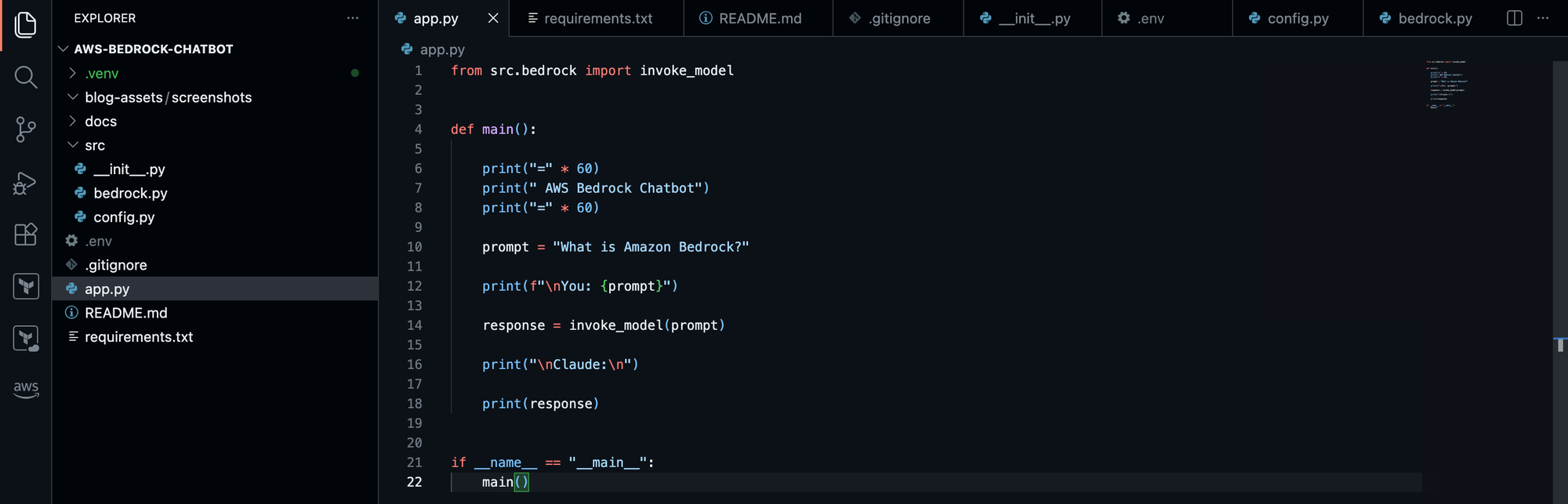
Although this is still a relatively small project, I wanted to start with a clean structure that can grow as we add more features throughout this series.
Preparing the Development Environment
Before writing any code I completed the following setup:
- Created a new Python project
- Configured a virtual environment
- Installed
boto3 - Installed
python-dotenv - Configured the AWS CLI
I also chose to keep configuration outside my application by using environment variables instead of hardcoding values as it makes switching regions or models much easier.
I have an .env file for the model ID and region, different accounts may have slightly different model IDs depending on the models and versions available:

My First Roadblock
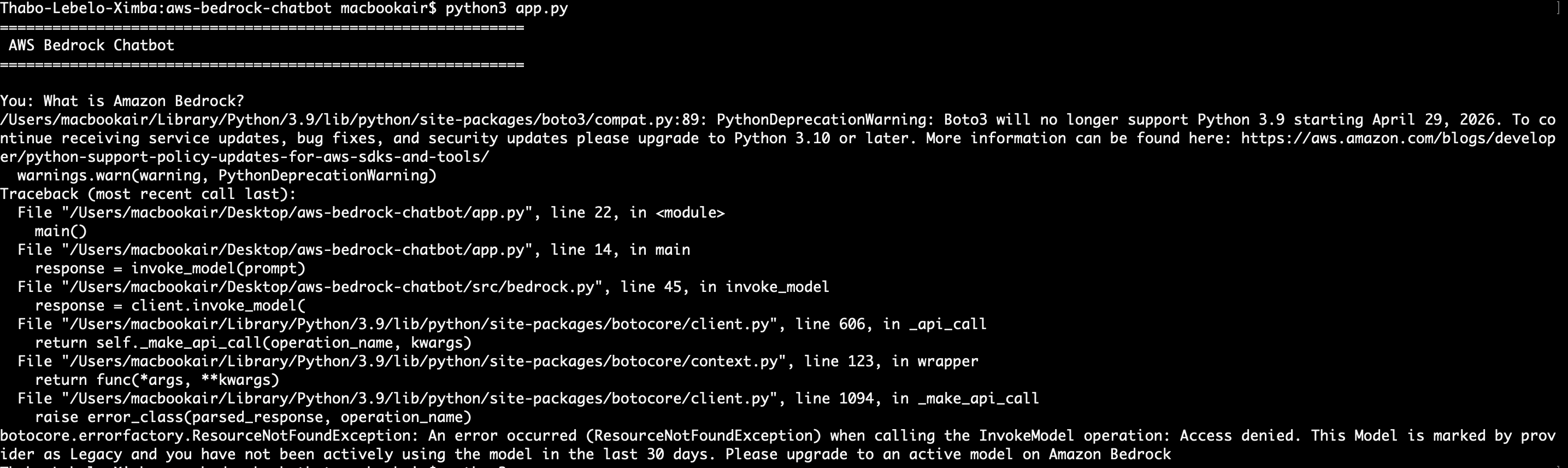
Nothing ever works perfectly on the first attempt. When I tried invoking my first model, I was greeted with an access denied error. After a bit of investigation, I discovered that the model I was using had been marked as a legacy model by the provider:
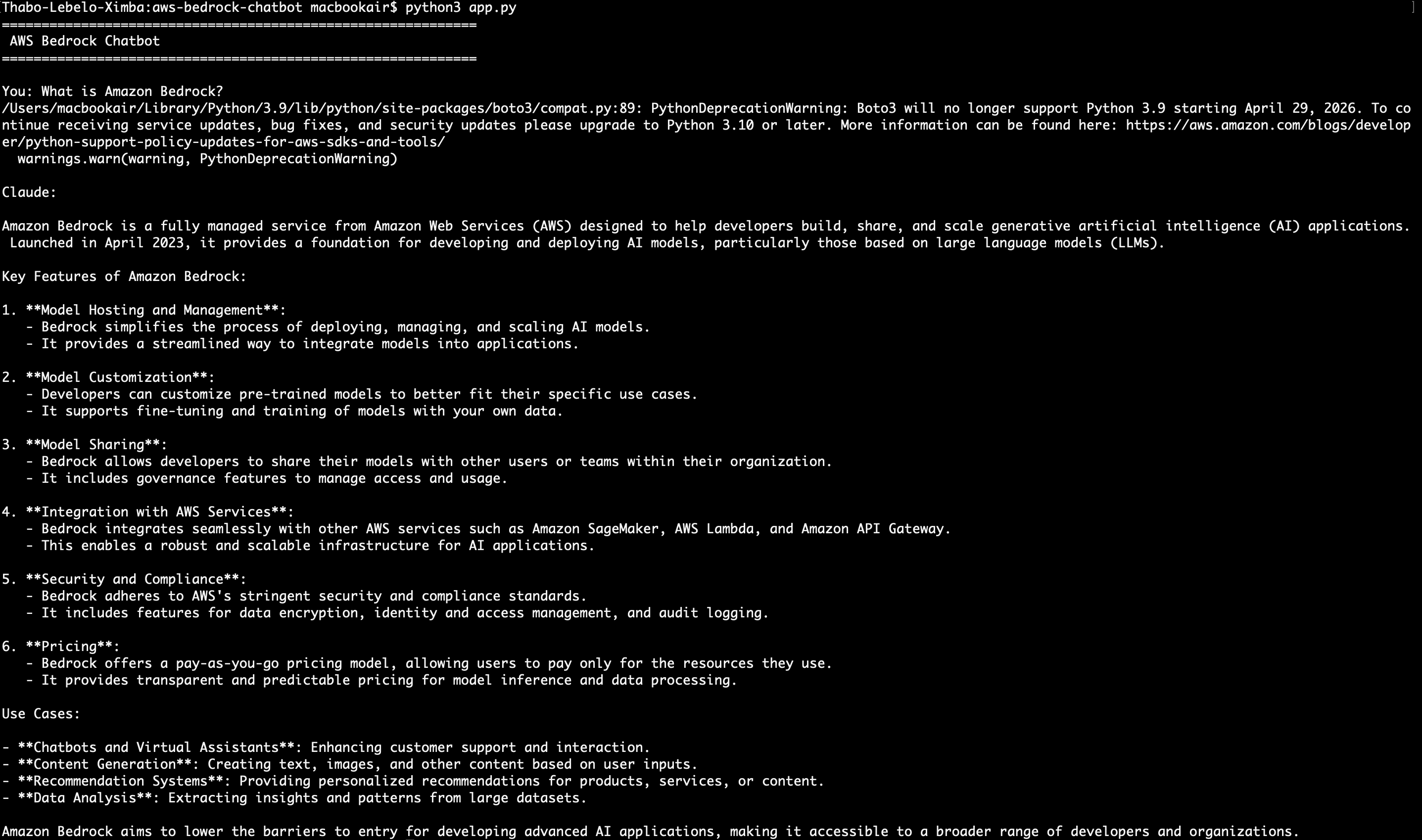
The fix was selecting a currently supported model and updating my implementation to use the Amazon Bedrock Converse API:
This was a valuable reminder that cloud development isn't just about writing code. Service configuration, permissions, API versions, and model availability are all part of the engineering process.
Lessons Learned
This first project taught me several lessons that aren't immediately obvious when reading the documentation:
- Amazon Bedrock is the service your application communicates with—not the foundation model directly.
- Foundation models are accessed through managed APIs.
- Configuration belongs outside application code.
- Good software design starts before the application becomes complex.
- Troubleshooting is part of the learning journey, not a sign that something went wrong.
What's Next?
In Part 2 we'll transform this simple proof of concept into an interactive command-line chatbot that can hold a conversation, respond to multiple prompts, and begin evolving into a real application.
From there, each article will introduce another capability until we've built a production-inspired AI solution on AWS.